Tasks & Workflows
A closing has 30 tasks. Build the checklist once.
Never miss a contingency date again.
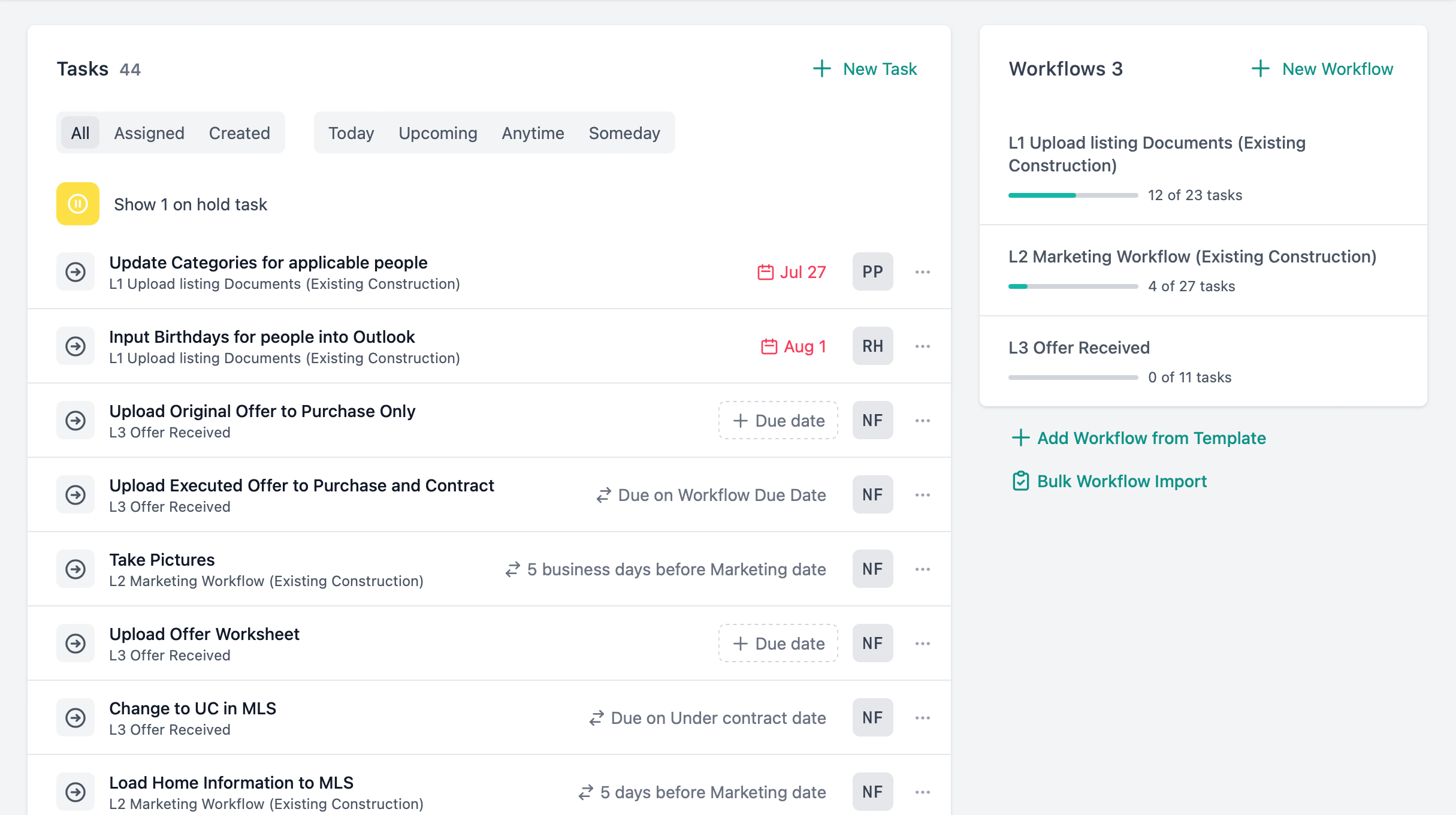
Reusable workflow templates for every contract type. Due dates that sync to closing, ratification, or any key date. When the date moves, every task recalculates. When you reassign an agent, their tasks follow.
Generic to-do lists don't understand real estate timelines. When a closing date changes by two weeks, you manually update 20 tasks — or you don't, and something gets missed.
New agents join your team with no process to follow. There's no checklist for what happens after ratification, no structure for who does what, and no system that adjusts when dates shift.
How it works
Scale your perfect process.
- Create reusable task checklists for every type of transaction so your team follows the exact same process every time.
- Tasks automatically assign to the right person based on their role—agent, coordinator, or support staff—the moment a template is applied.
- See exactly how far along any contract is with visual completion percentages and status counts.
Deadlines that adjust automatically.
- Tie task due dates to critical milestones like closing or inspection. When the key date changes, every dependent task recalculates instantly.
- Set deadlines based on real business days or calendar days, ensuring tasks never accidentally fall on a weekend or holiday.
- For critical deadlines that matter down to the hour, set specific due times so nothing slips by.
Absolute clarity on who is doing what.
- Clear statuses and priority levels ensure your team tackles the most urgent and critical tasks first.
- Attach documents, add notes, and @mention teammates directly inside the task so everything is exactly where it's needed.
- Soft-deletes preserve your audit trail, ensuring you have a complete record of work even if a task is canceled.
Follow-ups on autopilot.
- Schedule tasks to repeat on any cadence—daily, weekly, monthly, or customized intervals.
- Let tasks repeat forever, stop after a certain number of occurrences, or end on a specific date.
- Ideal for regular client check-ins, compliance reviews, and automated lead follow-up sequences.
Workflow and task details
- Attach tasks to contracts, leads, clients, vendors, or people
- Export your tasks (iCal) to Google Calendar, Outlook, or Apple Calendar
- Copy successful workflows from previous contracts to hit the ground running
- If a contract's agent changes, all role-based tasks instantly reassign to the new agent
- Use hashtags (#inspection, #followup) to group and find related tasks across deals
- @mention teammates in notes to immediately notify them
- Your dashboard automatically surfaces overdue and upcoming tasks
- Specialized reports highlight unassigned tasks and missing deadlines so nothing falls through the cracks
Related features
Contracts
Tasks live on contracts, synced to contract dates and contingency deadlines.
People & Relationships
Apply workflow templates to leads for follow-up sequences and client onboarding.
Dashboard
Overdue and upcoming tasks surface on your daily action center.
Reporting
Task reports show completion rates, overdue counts, and unassigned work.
See it for yourself.
Start a 14-day free trial or book a walkthrough with our team.